Two Things Most AI Video Tools Get Wrong: Control and Identity
Contents
Generative AI video tools have made content production remarkably fast, but for many creators, the technology creates a new kind of frustration. You type a prompt, wait for a draft, and receive a video set in a bizarre, hallucinated environment with a generic synthetic face that looks nothing like you. Editing the output feels nearly impossible, leading many creators to abandon AI tools altogether.
The industry data highlights two distinct barriers: a lack of creative control and an erosion of audience trust.
According to a report on overcoming AI video technology limitations by Vegavid, nearly 68% of enterprise AI video projects cannot be deployed without manual adjustments—proving that granular control over generated output is essential for practical use.
Simultaneously, audiences are actively rejecting synthetic, low-quality media. In the Sprout Social Q1 Pulse Survey, 56% of social media users reported regularly encountering "AI slop"—unrealistic or generic AI-generated content—and 50% of Gen Z users admitted to unfollowing, muting, or blocking creators whose videos feel visibly synthetic.
AI video generation itself isn't the problem; the issue is whether you can tweak the background before rendering and whether the face on screen remains authentically yours. Fypro’s AI Studio solves both challenges by giving creators precise environmental controls and personal avatar mapping.
Master Your Scene: How to Control Video Environments in AI Studio
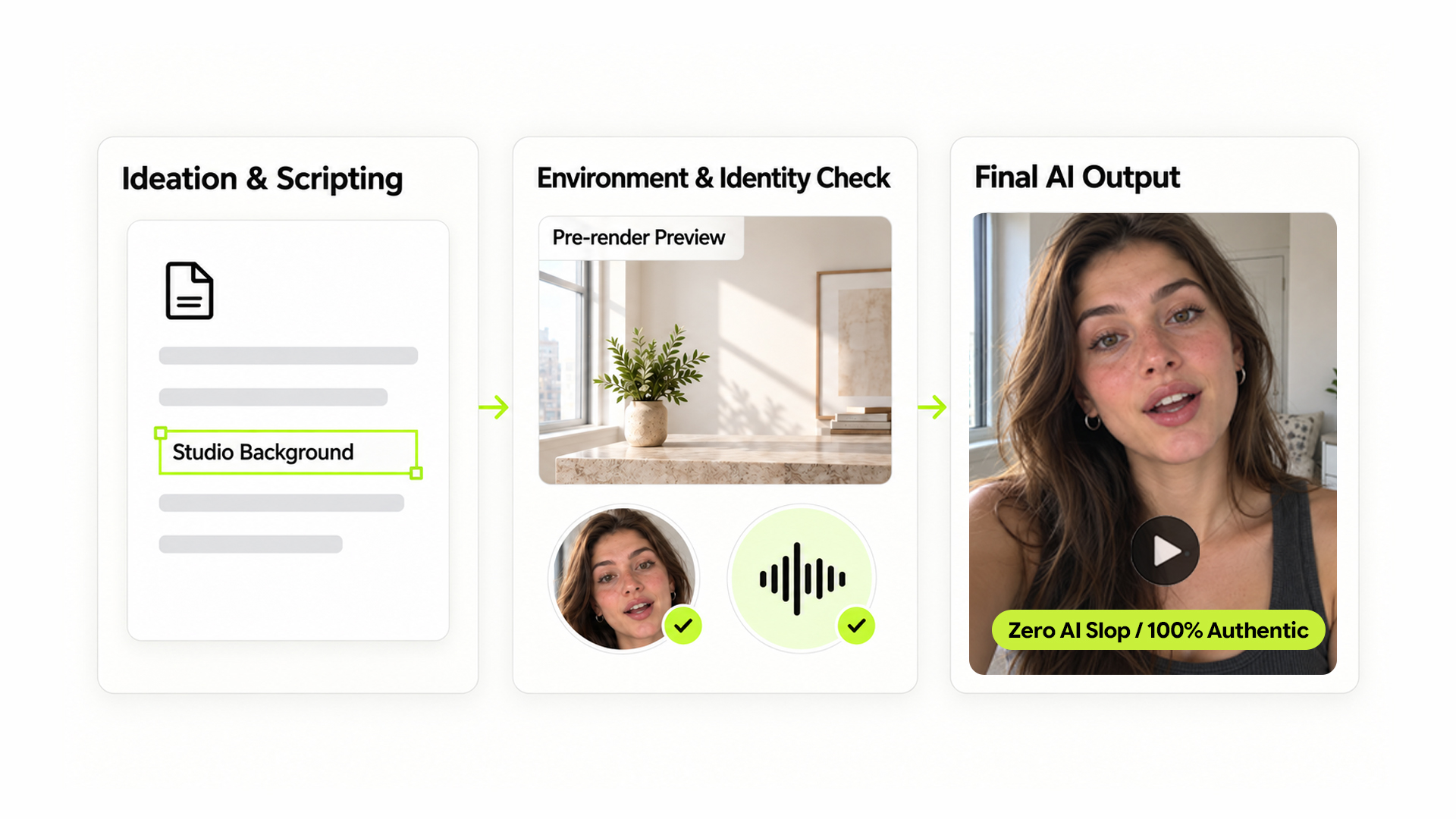
When an AI generator guesses the setting of a video, the results are rarely usable. AI Studio removes this unpredictability by establishing a clear environment pipeline before rendering begins.
Instead of leaving scene selection to chance, AI Studio gives you three ways to direct your video backgrounds:
- Automatic Script Parsing: If your script specifies a location—such as "a bright kitchen counter" or "a bustling urban street"—the AI automatically isolates the setting and structures the scene accordingly.
- Photo Reference Uploads: If you want to shoot in a specific location, you can upload a photo of your actual studio, workspace, or living room. The AI uses your image as a direct visual anchor rather than hallucinating a random background.
- Pre-Render Environment Confirmation: If you don't provide a photo reference, AI Studio generates an environment preview for your approval before rendering the full video. If the lighting is wrong, you can adjust it with a quick prompt—such as "change dusk to morning sunlight"—or request an entirely new scene.
For direct-to-camera talking head scripts without explicit background descriptions, you retain total command. Simply instruct the system: "Set this talking head video in a minimalist studio setting," and the AI applies that exact environment.
This workflow transforms environment selection from a post-generation gamble into a controllable, pre-render step.
Keep Your Face and Voice: Eliminating "AI Slop" with Custom Avatars
The fastest way to lose audience trust is by placing a generic AI avatar in front of your community. To build long-term brand equity, the face and voice in your video must be recognizably yours.
Fypro’s AI Studio handles personal identity through a dedicated Avatar mapping process:
- Visual Identity Mapping: Upload one clear, front-facing portrait alongside a full-body photo. AI Studio maps your facial structure, skin tone, and physical proportions to ensure the generated model matches your real-world appearance.
- Voice Cloning: Upload a clear audio sample under 15 seconds—spoken at a natural pace without background noise. The engine clones your vocal cadence, tone, and speech patterns.
- One-Click Avatar Deployment: Once your visual and audio profiles are saved in your Avatar settings, you never need to re-upload them. When drafting a new script, simply instruct AI Studio: "Use my Avatar profile and voice clone for this video."
This process directly addresses the rise of generic AI slop. By combining personal avatar mapping with our personalized AI content engine, you gain the production speed of automation while keeping your authentic voice intact.
Combine Efficiency with Authenticity
Scaling your short-form video output doesn't require handing your brand over to stock AI avatars or chaotic background generators. By mastering environment selection and preserving your personal identity, you turn AI into a reliable production co-pilot.
When paired with an AI-powered creator storefront, this workflow allows you to convert consistent, high-converting video content into owned business assets.
Take control of your video pipeline today. Sign up at fypro.ai, set up your custom Avatar profile, and start generating AI videos that actually look and sound like you.